Quick Summary
- ▸ Built for a electrical construction company (201 employees) in Medellin, Colombia.
- ▸ How CodeBranch built a custom budget control and Unit Price Analysis system for a 201-employee electrical construction company in Medellín — materials, labor, procurement, warehouses, progress reports and budget-vs-actual variance in one tool.
- Projects came under budget control — the company could prove at any moment during execution what projects were actually costing.
- Faster quoting — with the materials master and Unit Price Analysis library in place, pricing a new project became assembly instead of research.
Overview
Electrical construction is a business of thousands of small decisions. Almost nothing on a job site is a single line item: every unit of installed work is a set of materials plus the labor to put them in place. Multiply that across a set of blueprints and you have a budget with tens of thousands of moving parts, any one of which can quietly drain the project's margin.
The client, an electrical solutions company with 201 employees operating out of Medellín, knew what its projects should cost. What it did not have was a way to prove, at any moment during execution, what they were actually costing.
CodeBranch built that system: a custom web application that turns a set of drawings into a priced, controlled budget and then tracks reality against it, day by day, until the project closes.
Industries
Services Provided
- Web Development
- Custom Software Development
- Product Definition
Approach
The decision to build instead of buy was deliberate. What existed on the market was costly, and what the company needed was specific: Unit Price Analysis as the basis of every budget, biweekly progress reports as the basis of every bill, and a material and labor structure that mirrored how this company executed electrical work.
The project started small — one idea from the CEO, a modest development budget — and grew feature by feature as the operation leaned on it. Growth was driven by use, not by a roadmap written in advance.
CodeBranch ran three collaborative discovery sessions with the CEO to translate operational vision into technical requirements, producing requirements documentation, wireframes and mock-ups before a line of production code was written — the same definition-first discipline that became CodeBranch's Spec-Driven Development framework.
Here is what the platform does, module by module — from the materials catalog that feeds every cost calculation to the progress report that becomes the invoice.
What we built
A web application built from scratch in React and Node.js — not an ERP, and not a configured off-the-shelf product. The system is organized around executing a construction project: what it should cost, what it is costing, and what has been earned so far.
1. Materials master
Every material registered individually — screws, boxes, conduit, cable, faceplates — with its own price history: what was paid, when, and where it was bought. The catalog became the single source of truth for every cost calculation downstream.
2. Unit Price Analysis builder
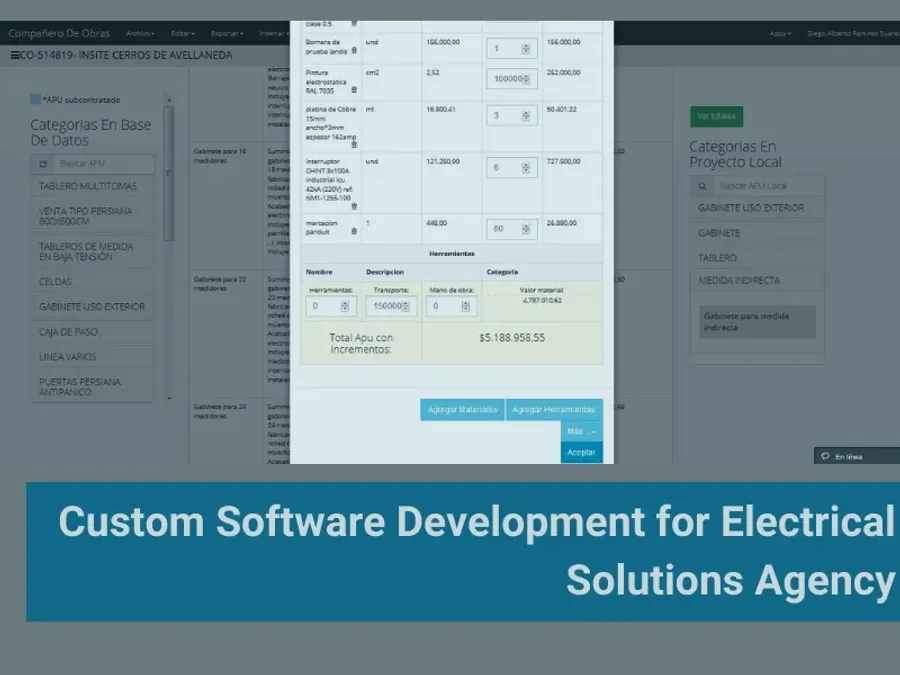
The heart of the system. Users compose any unit of work from its real components — every material it consumes plus its labor allocation — and the system computes the unit cost. Each Unit Price Analysis carries both its bill of materials and its labor, so the price of a unit of work stops being a number someone remembers and becomes a structure the company owns, reuses across projects and can audit.
3. Project budgeting
Take-off quantities from the drawings are multiplied by the unit prices to produce the full project budget. This produces two things the company never had before: a total project cost built bottom-up from real components, and consumption ceilings — “this project consumes at most 30,000 screws” — a hard reference against which every purchase order and every withdrawal from the warehouse can be checked.
4. Labor planning and control
Personnel are modeled as a distinct resource with skill tiers — site foreman, skilled officers, helpers — each with its own rate. Staffing is planned month by month across the project timeline and validated against the labor pool the budget allows. The operational goal is explicit: execute below budget, because the gap is the margin.
5. Procurement and suppliers
Purchase history by supplier: what was bought, at what price, from whom and when — so purchasing decisions rest on the record rather than on whoever remembered the last quote.
6. Warehouse and material movement
Inventory across warehouses, with visibility into how much material moved from one warehouse to another and to which project it was assigned.
7. Schedule tracking
Project timelines with progress visible at any moment — where the work is, where it should be, and which fronts are falling behind.
8. Budget vs. actual variance
The control module. Budgeted consumption against actual consumption, per material, per labor tier, per project. This is what converts data into an early warning: if the project is at the halfway mark and the cable is already gone, something is seriously wrong — and it is visible now, not at close-out.
9. Biweekly progress reports
Every two weeks the team registers executed work and the system produces the progress report: what was completed, and what is to be billed for it. The document that used to be assembled by hand became an output of the system.
How it works: from drawings to billing
- Register the materials. Every input the company installs, each with its current price and purchase history.
- Build the Unit Price Analyses. Compose each unit of work from the materials it consumes plus its labor allocation. The system computes the unit cost, and the library is reused on every project that follows.
- Build the budget. Take off the quantities from the drawings, multiply by their unit prices. The result is the project budget, its material consumption ceilings and its labor pool.
- Execute against it. Purchase orders, warehouse movements and staffing are all recorded against those ceilings.
- Watch the variance. Budgeted vs. actual consumption is visible throughout execution, not after it.
- Bill it. Every two weeks, executed work becomes a progress report — the client-facing record of what was done and what is owed.
What this engagement says about how CodeBranch works
- Definition before code. Three discovery sessions, requirements documentation, wireframes and mock-ups before development — the practice that is now formalized in CodeBranch’s Spec-Driven Development (SDD) framework, where every project opens with a Product Definition phase and per-feature estimates.
- Domain first, software second. The system is organized around Unit Price Analysis, progress reporting and real site roles because that is how construction works in this market. Generic project management software fails here for exactly that reason.
- Custom where custom pays. Nothing here was configured on top of a generic platform. The data model — materials, unit prices, labor tiers, progress reports — was built to match the operation, which is why the operation could lean on it.
- Ship, use, grow. The tool expanded module by module, driven by what the operation actually needed next.
Clutch Ratings
Results
- Projects came under budget control — the company could prove at any moment during execution what projects were actually costing.
- Faster quoting — with the materials master and Unit Price Analysis library in place, pricing a new project became assembly instead of research.
- Supply operations under management — purchase history, supplier pricing and warehouse movements stopped being tribal knowledge.
- Material shrinkage, slow fronts and labor burn rates became visible early enough to act on, while there was still budget to protect.
- The tool became the company's operational backbone — leadership knew at any moment how much money the project had, how much it had spent and why.
- "We managed to get our projects in control, and now we have a tool that allows us to quote projects faster and also control supply operations." — CEO
- "I really liked their approach and they have become a part of our team." — CEO